
Scripts / Touch Stretch
Touch Stretch
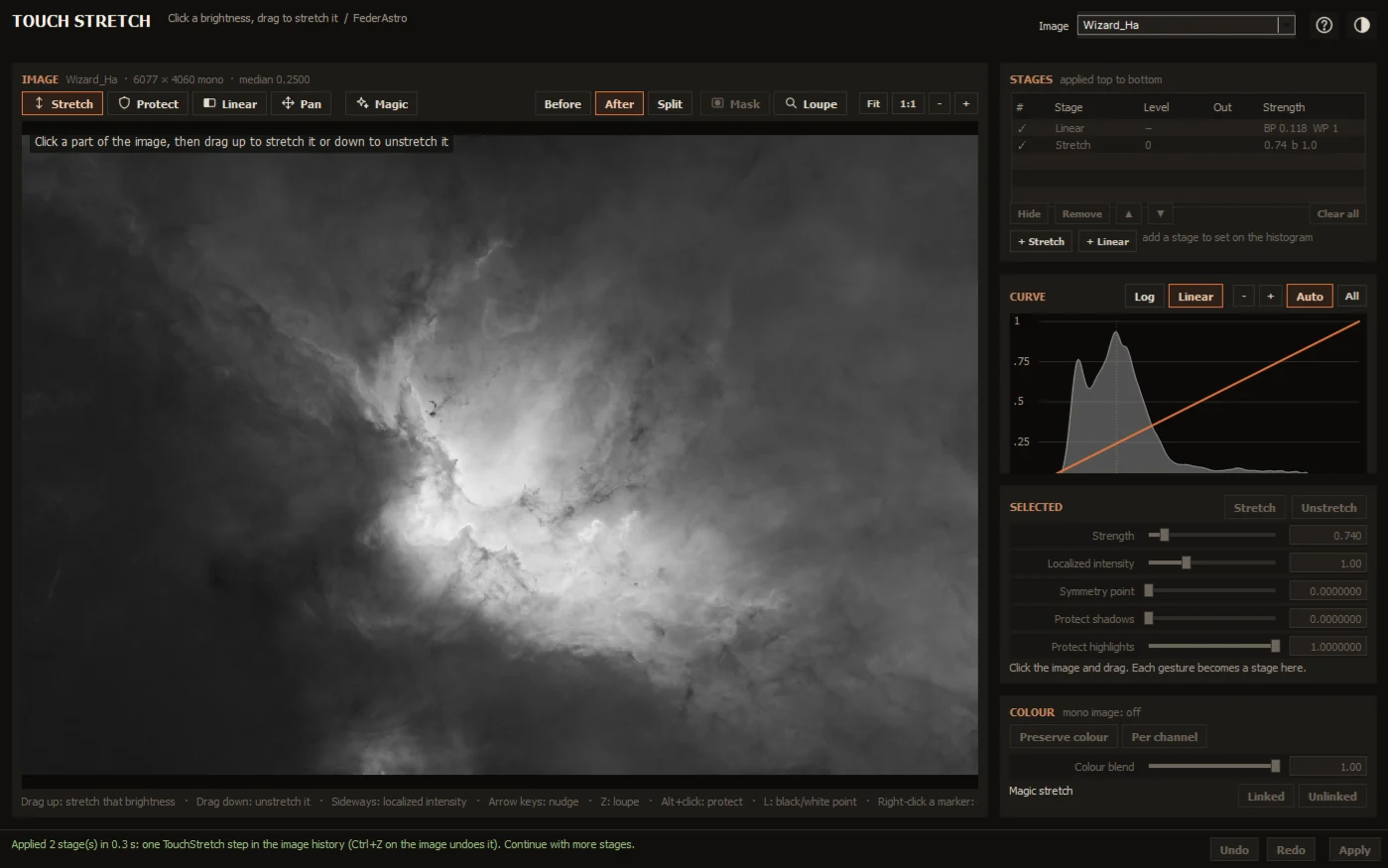
Stretch an image by touching it: click a brightness and drag up to bring it out or down to hold it back, in a window of its own with a live full-resolution preview.
Overview
Stretching usually means moving sliders and watching a curve until the part of the image you care about looks right. Touch Stretch turns that around: click the faint nebula you want to bring out and drag up. Every pixel of that brightness, anywhere in the image, brightens and gains contrast; drag down to hold a bright core back.
Each gesture is a hyperbolic stretch stage centred on the brightness you clicked. Stack stages, fine-tune them on the curve and histogram, set black and white points by touch, protect levels, or start from a statistical Magic stretch. Apply runs them on the image as one step in its history, and the stages can be kept as a process icon.
Features
Stretching by touch
- Click a brightness and drag up to stretch it, down to unstretch
- Drag sideways to concentrate or spread the stretch
- Grab a stage's square again to change it; arrow keys nudge it
- Linear tool for black and white points, Protect for levels to keep
Stages and curve
- Stages applied top to bottom, each anchored on the original image's brightness
- Strength, localized intensity, symmetry point and shadow / highlight protection
- Histogram before and after, with handles you drag along it
- Log or linear axis, zoom down to a thousandth of the range, auto fit
Magic
- Soft, Medium and Deep first stretches from the image's statistics
- Target median and black point you can set
- Linked or unlinked, to neutralize the background of colour images
Seeing and working
- Live preview at full resolution, only the pixels on screen computed
- Before, after and split views, a loupe, zoom and pan
- Preserve colour or per channel; the image's mask honoured
- Undo and redo, Reset, Darkroom and Paper themes
Install
Add the FederAstro repository to PixInsight once. PixInsight then installs Touch Stretch and offers every future update automatically. Everything in it is signed by a Certified PixInsight Developer.
- In PixInsight, open Resources ▸ Updates ▸ Manage Repositories.
- Click Add and paste
https://federastro.com/pixinsight/ - Click OK, then open Resources ▸ Updates ▸ Check for Updates.
- Apply the update and restart PixInsight when it asks.
- Open it from Process ▸ FederAstro ▸ Touch Stretch.
Requirements
- PixInsight
- 1.9.5 or later
- Platforms
- Windows (64-bit) and macOS (Apple silicon)
- Type
- PixInsight module (a process with its own window)
- License
- Free
Changelog
Version 0.1.1
- A rainbow FederAstro banner in the Process Console the first time its window opens in a session
Version 0.1.0
- First release in the FederAstro repository, for Windows (64-bit) and macOS (Apple silicon)
- Its own window with the image inside it: stretch, linear and protect by touch, the curve with its handles, Magic
- Apply as one TouchStretch step in the image's history; the stages as a process icon
- Documentation page in PixInsight's Documentation Browser
Credits and license
Touch Stretch is written by afeder (FederAstro). The hyperbolic stretch equations are by David Payne and Mike Cranfield. This product is based on software from the PixInsight project, developed by Pleiades Astrophoto and its contributors (https://pixinsight.com/).