
Scripts / Tilt Doctor
Tilt Doctor
Finds sensor tilt from the size of the stars across your subs: where the sharpest spot sits, how much the corners differ, and how that changes between sessions.
Overview
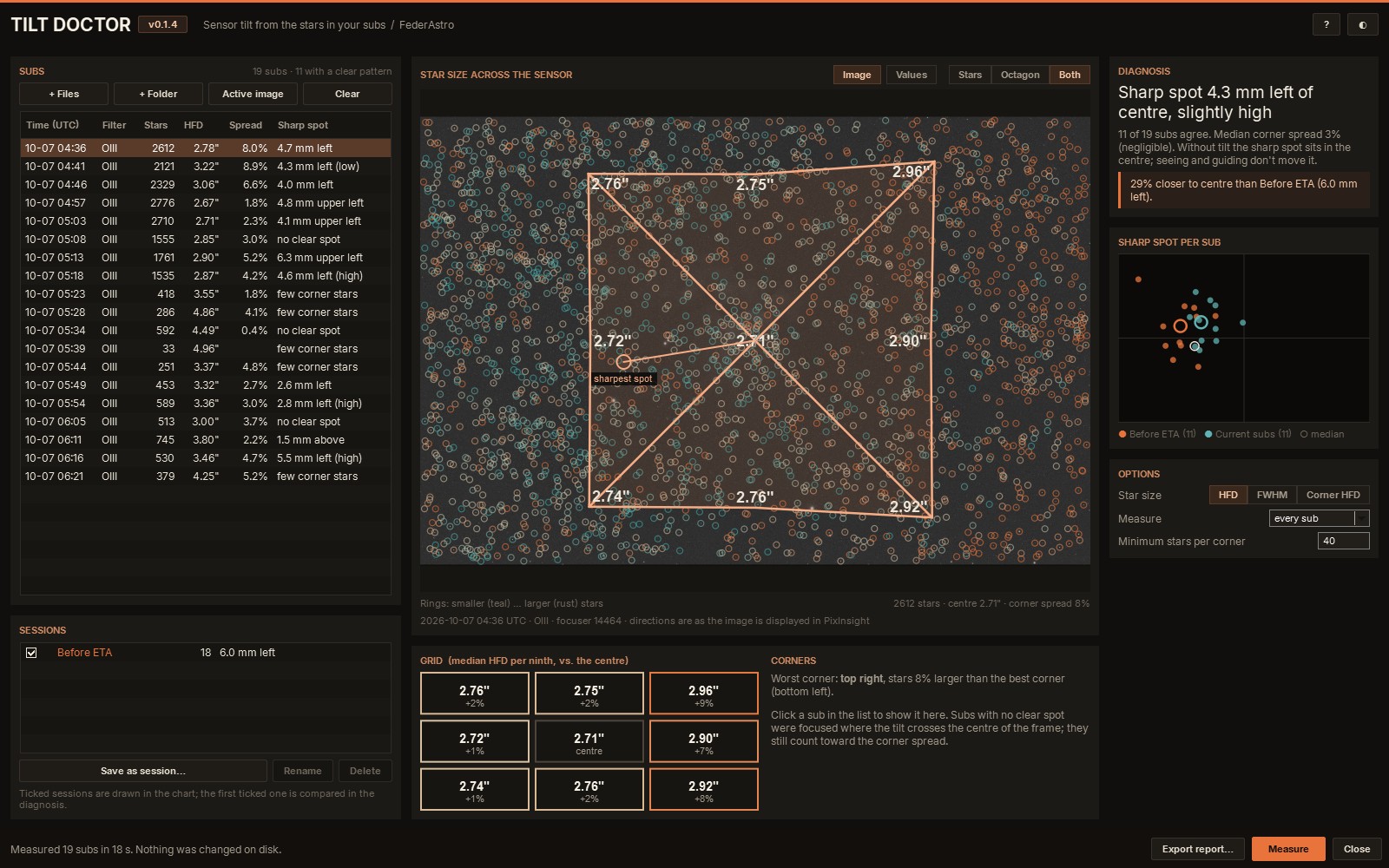
A tilted sensor shows up as stars that grow toward one side or corner of the frame. Tilt Doctor measures every star in your subs with PixInsight's own star detection and PSF fitting, and finds where on the sensor the stars are smallest. Without tilt, that sharp spot is the centre of the frame; with tilt it moves to one side, and Tilt Doctor tells you how far and in which direction.
It looks at a whole night of subs rather than one frame, because a sub focused right where the tilt crosses the centre hides it. Save the results as a session, adjust your tilt plate, and the next session is compared with the last: you see whether the sharp spot moved closer to the centre.
Features
Measuring
- Every star found and fitted with PixInsight's StarDetector and PSF fitting, about a second per sub
- Star size as HFD (half-flux diameter) or FWHM
- Corner HFD option: stars with SNR above 30, medians in a 3 × 3 grid, tilt relative to the median of all stars
- Subs with too few stars in a corner (clouds, haze) listed but left out
Seeing it
- The sub itself under the measurements, with a ring around every measured star
- An octagon of the nine region medians, each point as far out as its stars are large
- Each star's size on the map, and its HFD, FWHM and position when you point at it
- A 3 × 3 grid of median star sizes against the centre
The answer
- Where the sharp spot sits: how far from the centre and in which direction
- Corner spread: how much larger the stars are in the worst corner than in the best
- How many subs agree, and the sharp spot of every sub on a chart
Before and after
- Save a session's results and compare the next one with it
- A plain verdict such as "29% closer to centre than Before ETA"
- A one-page PNG report and a CSV of every sub, ready to share
Install
Add the FederAstro repository to PixInsight once. PixInsight then installs Tilt Doctor and offers every future update automatically. Everything in it is signed by a Certified PixInsight Developer.
- In PixInsight, open Resources ▸ Updates ▸ Manage Repositories.
- Click Add and paste
https://federastro.com/pixinsight/ - Click OK, then open Resources ▸ Updates ▸ Check for Updates.
- Apply the update and restart PixInsight when it asks.
- Run it from Script ▸ FederAstro ▸ Tilt Doctor.
Requirements
- PixInsight
- 1.9.5 or later
- Platforms
- Windows, macOS and Linux
- Inputs
- Subs (FITS or XISF), raw or calibrated; a night's worth gives the most dependable answer
- License
- Free (freeware)
Changelog
Version 0.1.4
- The third Star size option is now called Corner HFD (the same measurement)
- Your saved settings and sessions carry over
Version 0.1.3
- License: a freeware notice in the script and on its documentation page (free for any use)
Version 0.1.2
- A rainbow FederAstro banner in the Process Console when it starts
Version 0.1.1
- Subs with and without a pixel size are no longer mixed in one summary
- Debayered colour files are measured at full size
- Export report asks before replacing an existing file
Version 0.1
- First release in the FederAstro repository
- Sharp spot, corner spread, octagon and grid from every star in your subs
- HFD, FWHM and Corner HFD measurements; sessions; PNG and CSV report
Credits and license
Tilt Doctor is written by afeder (FederAstro). Freeware: free for any use, including commercial imaging work; unchanged copies may be shared free of charge, but it may not be sold and changed copies may not be distributed. Provided as is, without warranty.