
Scripts / SPACE Magic
SPACE Magic
SPACE Magic (Smart Pixel Artifact Cleanup Engine) heals the smooth halo leftovers a star removal leaves, satellite trails, dust donuts and hot pixels with a click or two. On halo leftovers it gives back only the grain and invents no detail, and Find leftovers heals every one it finds in the star field at once.
Compared with traditional healing
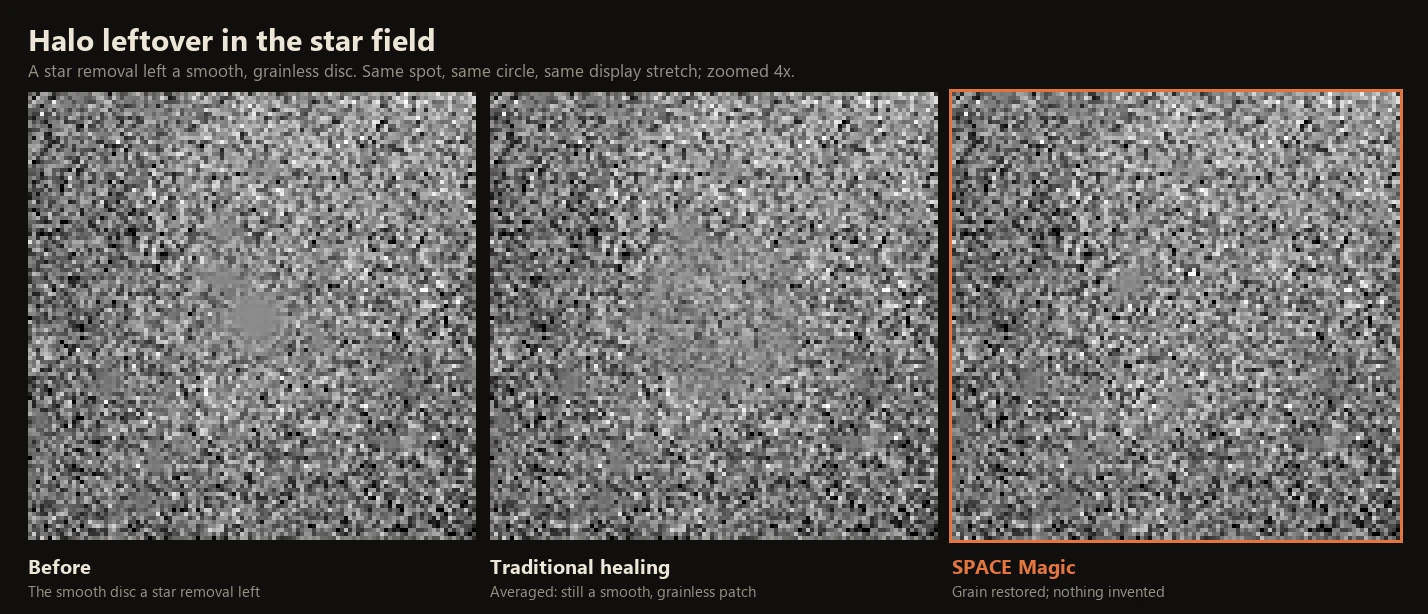
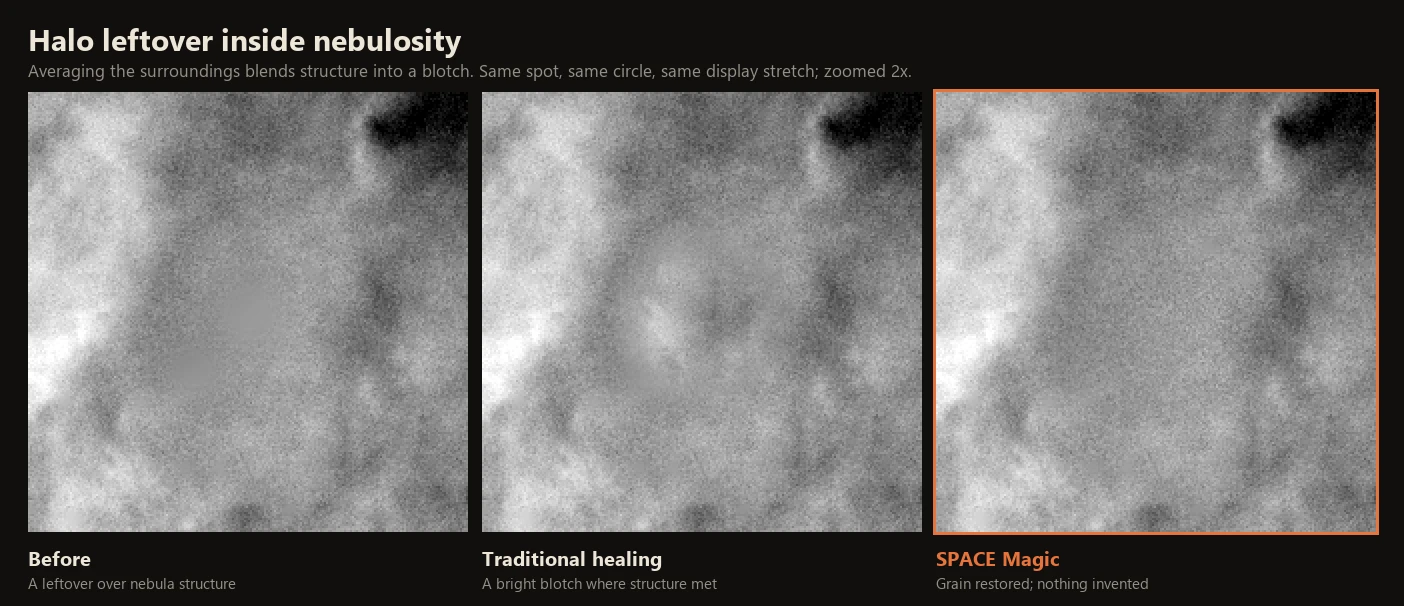
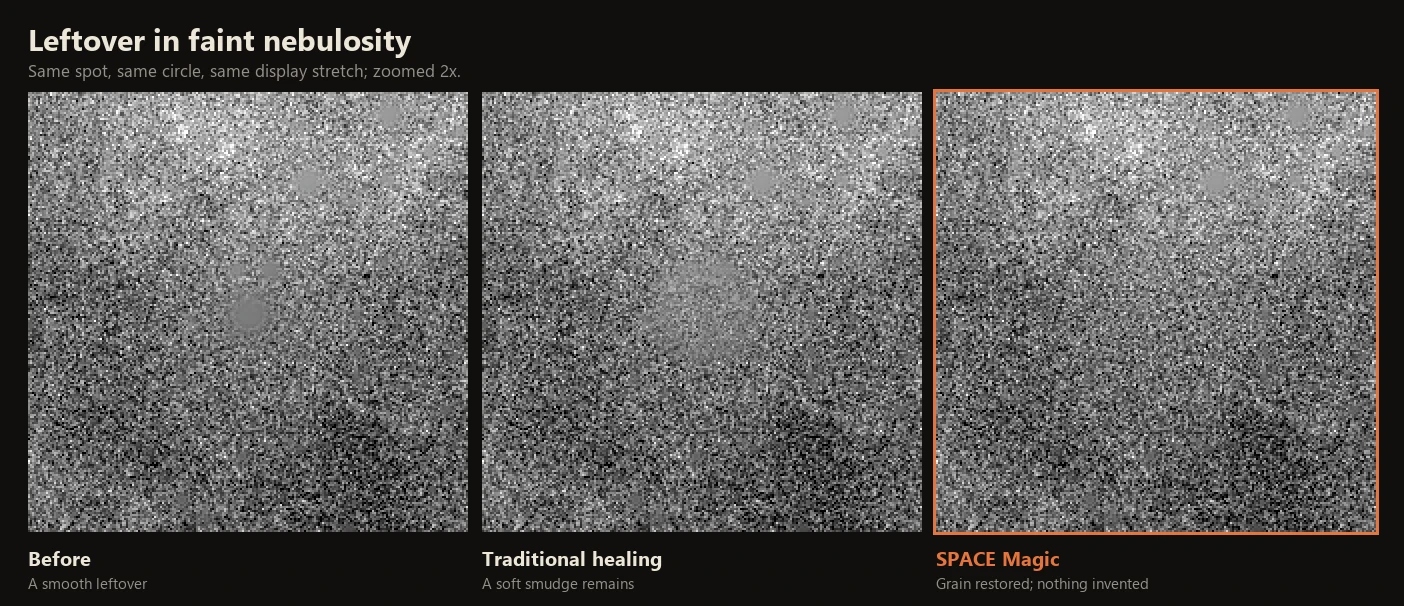
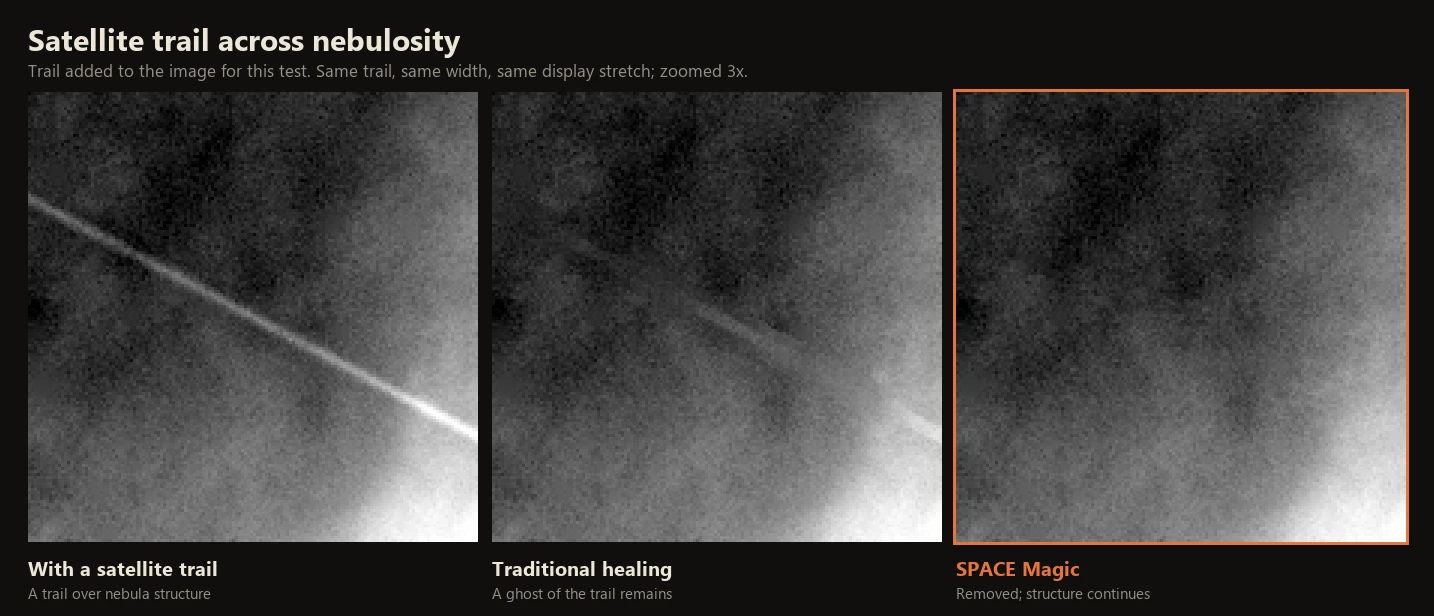
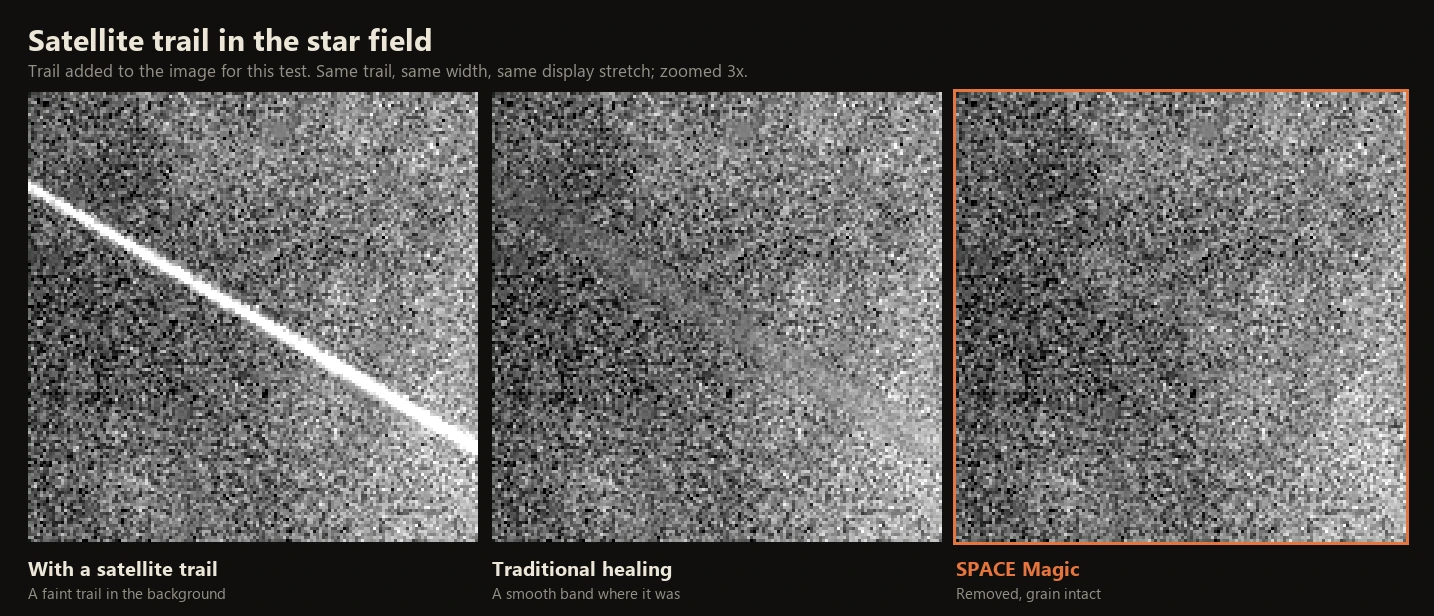
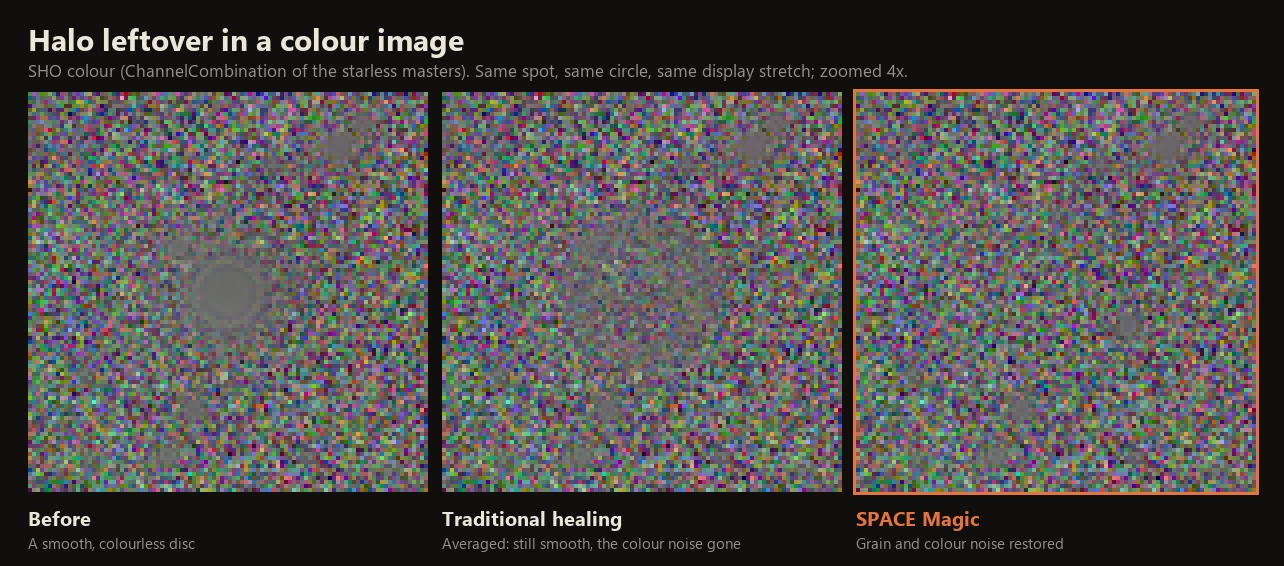
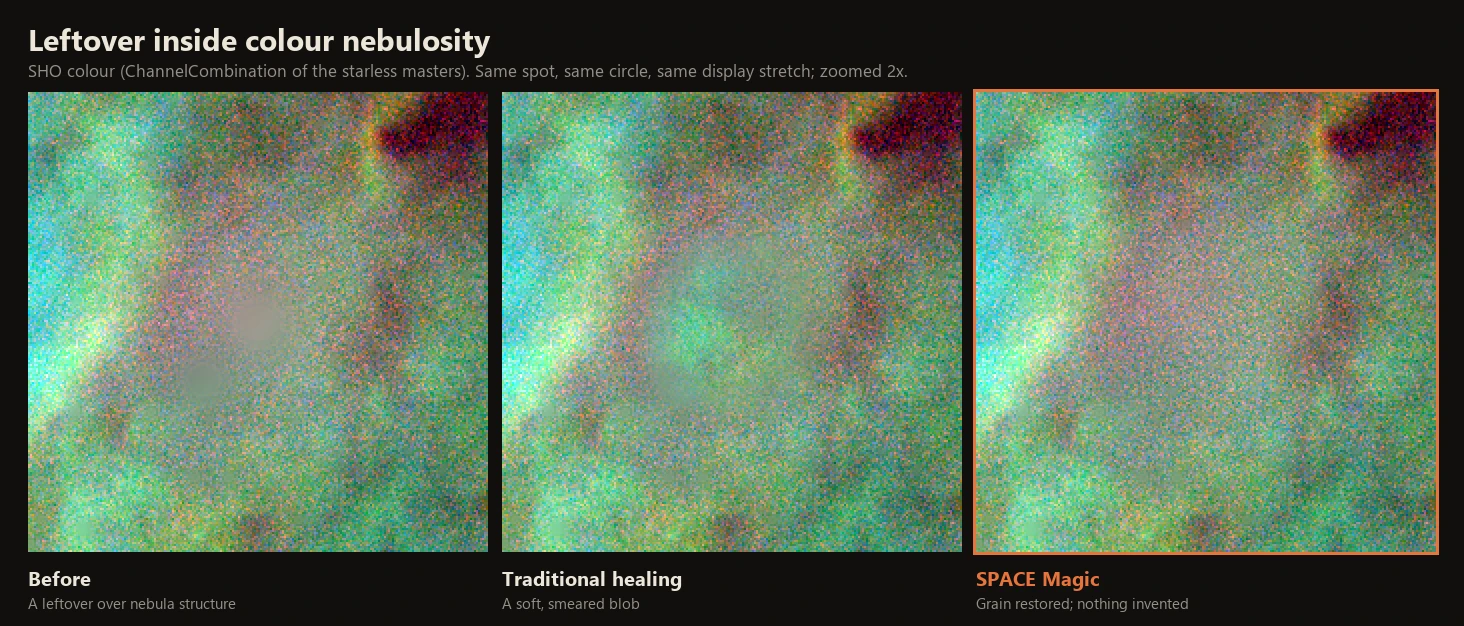
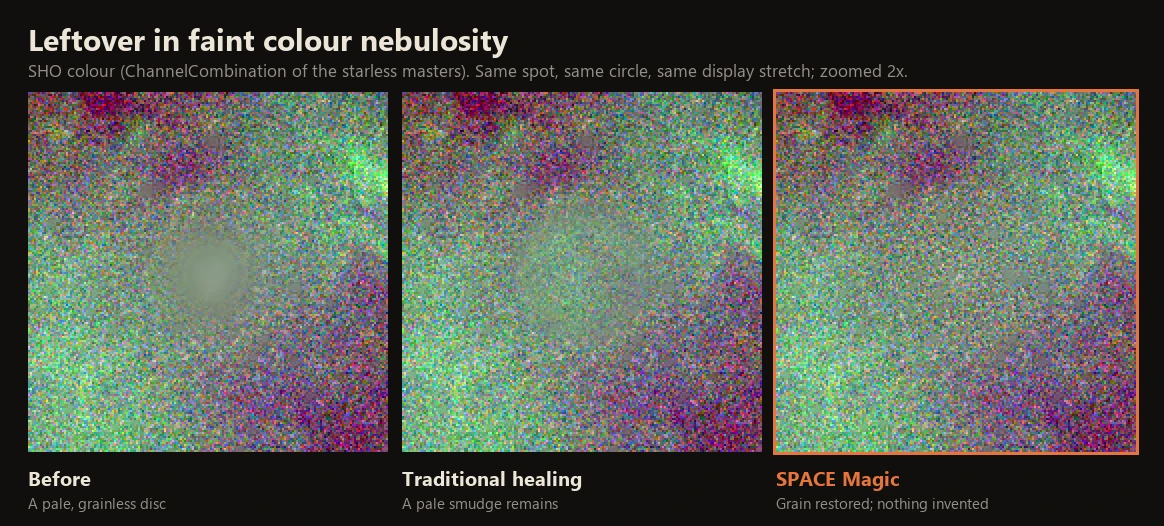
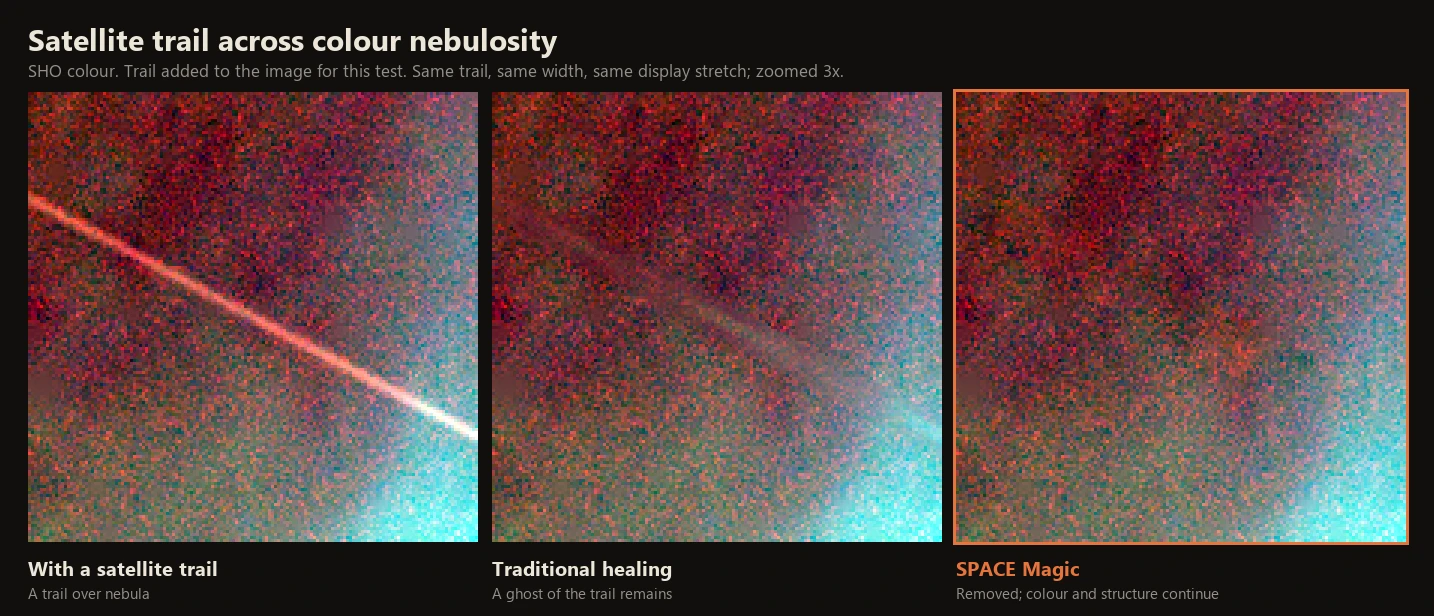
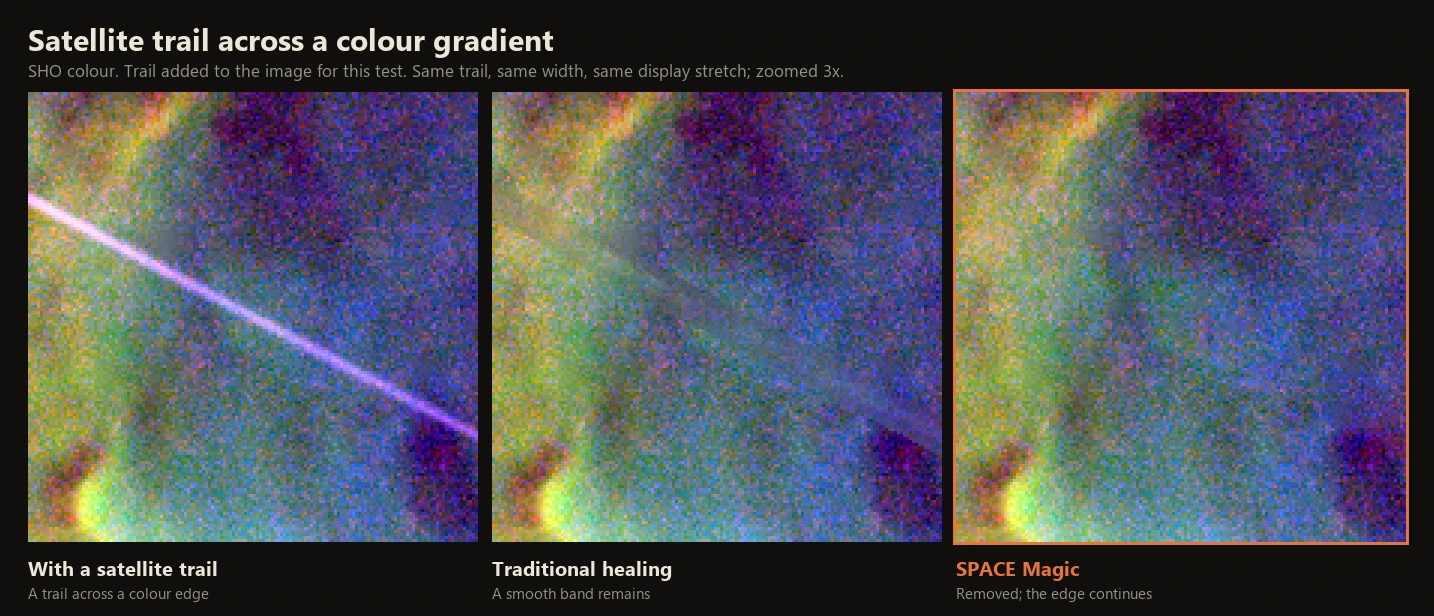
Star removal leaves smooth, grainless discs where the brighter stars were, and a satellite trail leaves a line. Traditional healing averages the surroundings into the spot: the disc becomes a smooth smudge, the trail a ghost band.
On a halo leftover, SPACE Magic's Restore grain keeps what is already there and gives back only the grain, copied from a nearby patch that matches. No nebula detail is invented where the star was. A trail is replaced, and the grain and structure around it carry on across.
With From reference, a trail is healed from another registered image of the same field, so the nebula edge and the stars under it come back close to the original, shown as a fourth panel. It works best on starless images.
Mono (Hα)
Color (SHO)
From reference
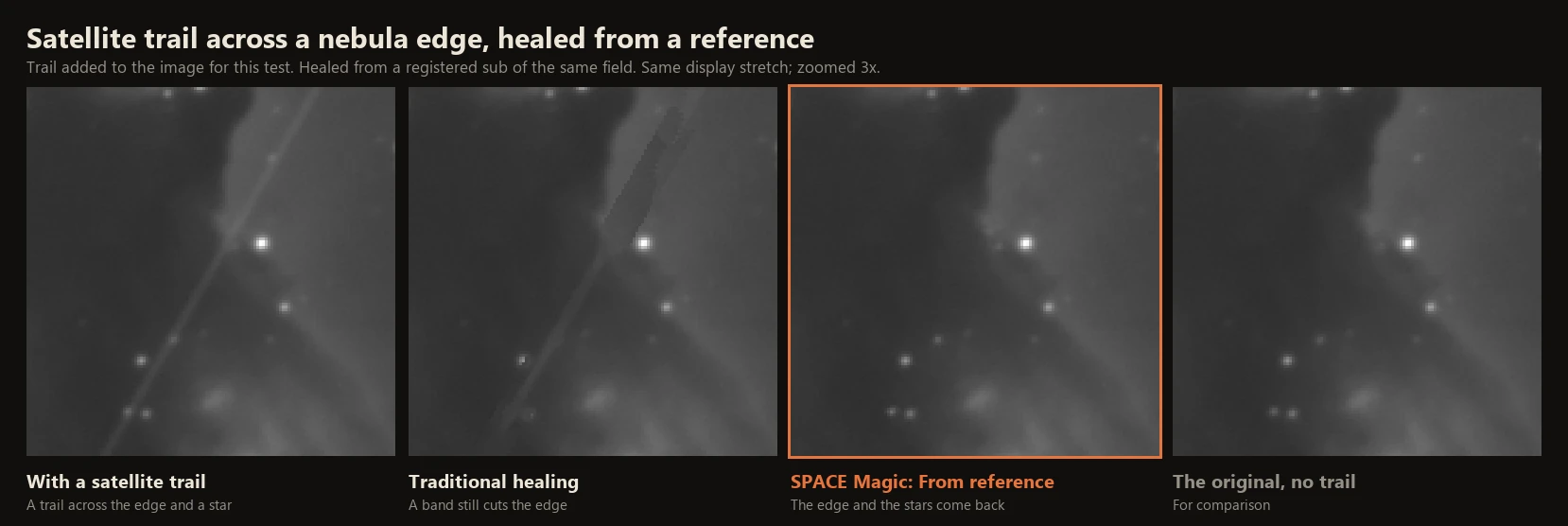
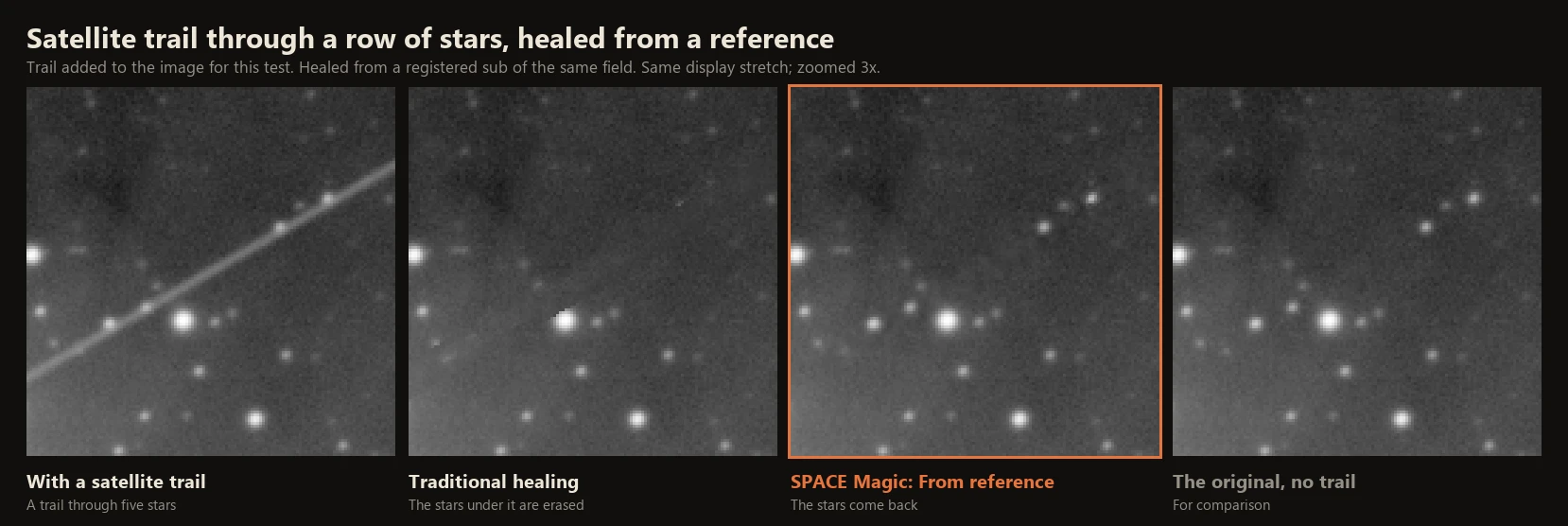
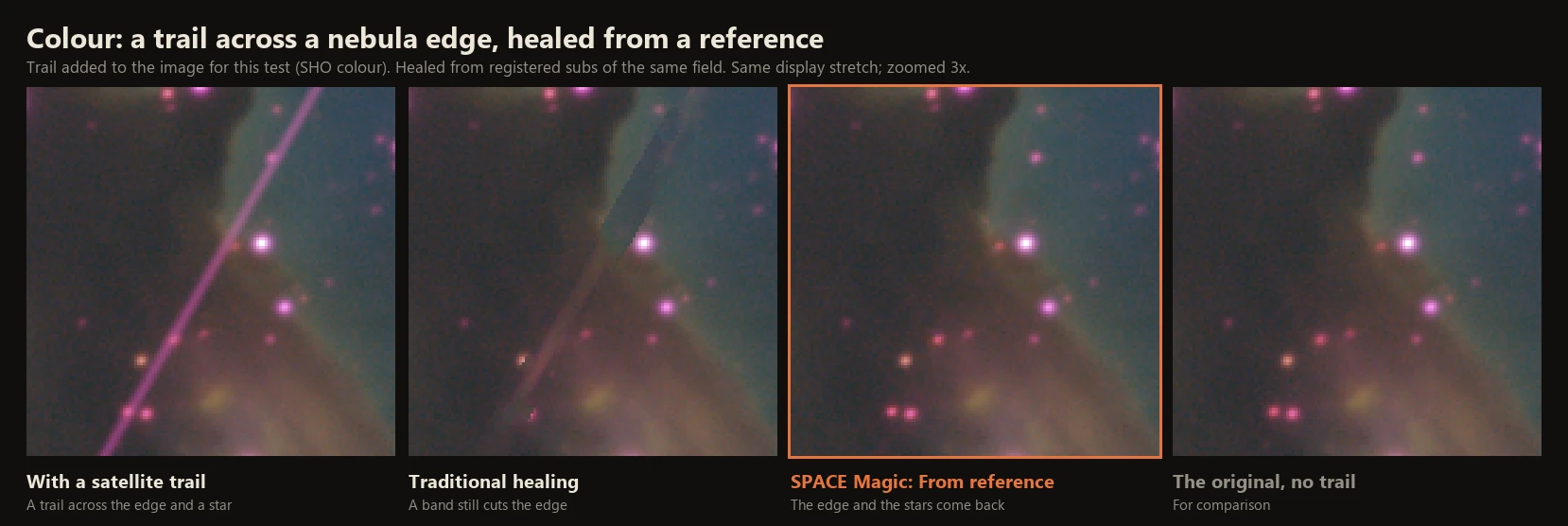
Crops of my Wizard Nebula masters, in Hα and as an SHO color combination: starless and stretched for the Mono and Color tabs, linear with stars for From reference. In every comparison the panels show the same spot, healed with the same circle or trail width, at the same display stretch. The satellite trails were added to the image for this test; the From reference comparisons add the original without the trail as a fourth panel. Leftovers that neither tool was asked to heal stay in every panel.
Overview
Star removal often leaves a smooth, grainless disc where a bright star sat, often wider than it looks on screen. SPACE Magic heals those, and dust donuts, hot pixels and satellite trails, with a click or two.
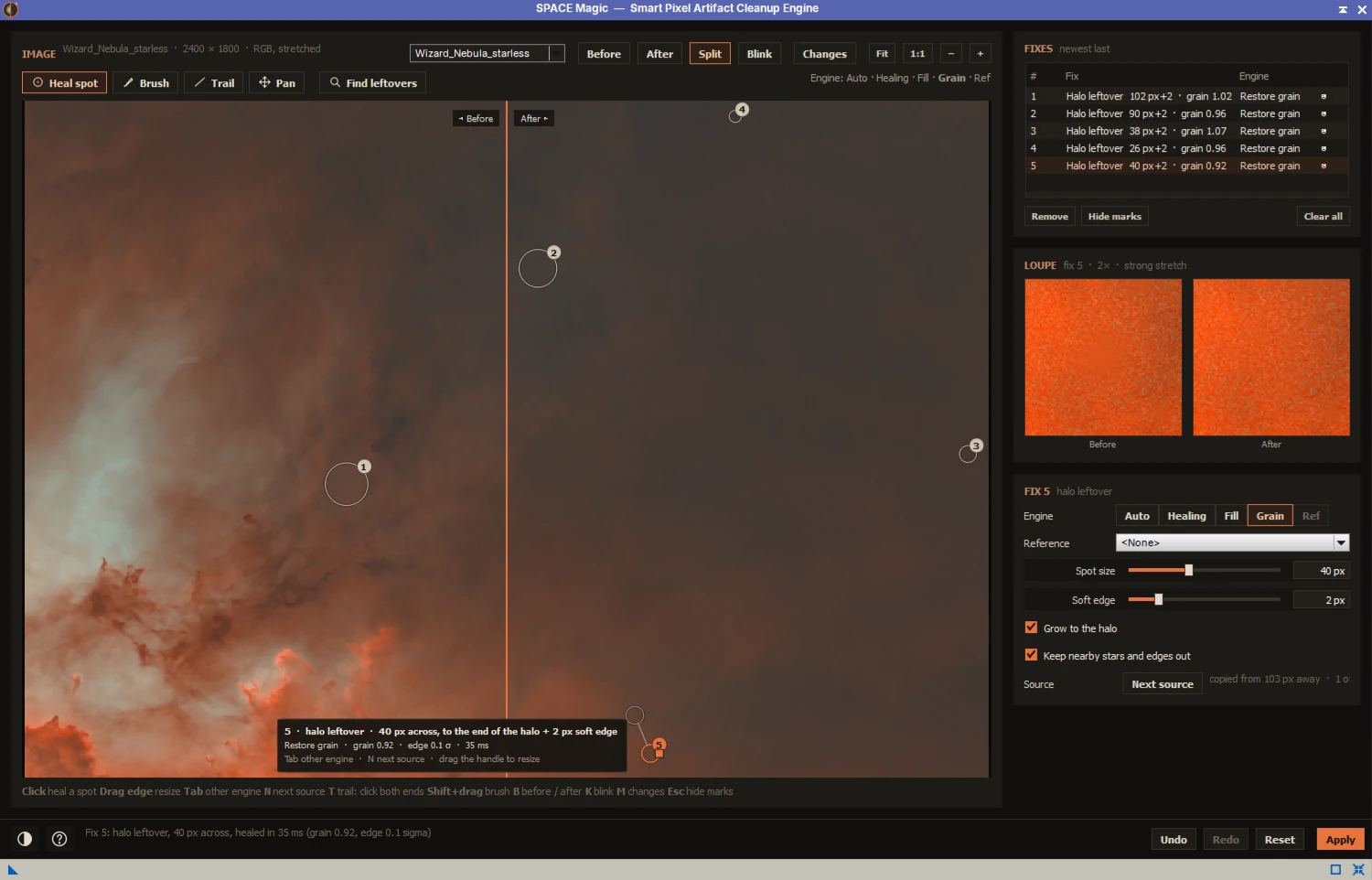
Click the middle of a blemish: SPACE Magic finds where it ends, picks a nearby place whose surroundings match, and heals it at once, usually in a few milliseconds. Find leftovers looks over the star field for halo leftovers and heals every one it finds. Each fix shows in a loupe, before and after, at a strong stretch; Apply heals the image as one step in its history.
For trails there is From reference: heal from another image of the same field, registered to this one, such as another night's master or a registered sub. The nebula and stars under the trail then come from that image's own data. It works best starless: remove the stars from both images the same way, then heal. A reference that doesn't line up star for star, or a starless image paired with a starred one, is refused with the reason.
In the From reference pictures above (the linear Wizard Nebula masters, a trail added for the test, healed from a registered sub of the same field), the large-scale error against the original along the trail across the nebula edge was 10.9 noise sigma with traditional healing, 3.7 with SPACE Magic's Auto (not pictured) and 0.39 with From reference. Through the row of stars, the error on the star pixels was 39.7, 41.2 and 3.6 sigma.
Features
Click to heal
- A click finds the blemish's edge: the outline stops where the grain is back
- With Keep nearby stars and edges out, neighboring stars inside the outline keep their pixels
- Next source copies from the next-best place; drag a fix to move or resize it
- Trail tool: click both ends of a satellite trail; a brush for strokes and areas
Engines
- Restore grain for halo leftovers: keeps the image's own content, copies in only grain
- Healing: one matching nearby patch, blended without a seam
- Fill: synthesizes larger areas patch by patch from the edge inwards
- Auto chooses the one whose grain and edge match the surroundings better
- From reference: heals a trail from a registered image of the same field; best starless; a sharper reference's stars are blurred to the image's sharpness
Find leftovers
- Looks over the whole star field for halo leftovers, about a second on 25 megapixels
- Each one becomes a fix of its own, healed at once
- Nebulosity is left alone: click those leftovers yourself
Seeing and applying
- A loupe shows each fix before and after at a strong stretch
- Mono and RGB, linear or stretched; the three channels healed together
- Apply heals the image as one step in its history; the fixes can be kept as a process icon
Checking the result
- Blink (K): before and after alternate in place at a steady rate (Shift+K: slow, normal or fast); pan and zoom while it blinks
- Changes (M): every pixel the fixes changed is tinted, green where real data was kept or restored (Restore grain, From reference) and orange where it was synthesized (Healing, Fill)
- The status line counts the changed pixels and how many came from real data
- A guided first session of about a minute on your own image, offered once; Shift+F1 replays it
Install
Add the FederAstro repository to PixInsight once. PixInsight then installs SPACE Magic and offers every future update automatically. Everything in it is signed by a Certified PixInsight Developer.
- In PixInsight, open Resources ▸ Updates ▸ Manage Repositories.
- Click Add and paste
https://federastro.com/pixinsight/ - Click OK, then open Resources ▸ Updates ▸ Check for Updates.
- Apply the update and restart PixInsight when it asks.
- Open it from Process ▸ FederAstro ▸ SPACE Magic.
Requirements
- PixInsight
- 1.9.5 or later
- Platforms
- Windows (64-bit) and macOS (Apple silicon)
- Type
- PixInsight module (a process with its own window)
- Images
- Mono and RGB, linear or stretched
- From reference
- Another image of the same field, registered to this one and the same size; starless with starless, starred with starred
- License
- Free
Changelog
Version 0.4.0
- First release: click-to-heal spots, trails and brush strokes, with the Healing, Fill, Auto and Restore grain engines
- Find leftovers heals the halo leftovers a star removal left in the star field
- Restore grain, the default for halo leftovers: no structure is copied, so no nebula detail is invented
- From reference, chosen per fix: heals a trail from another registered image of the same field, bringing back the nebula and stars under it
- Blink and Changes for checking the result; Changes shows which pixels came from real data and which were synthesized
- A guided first session on your own image (Shift+F1 replays it)
Credits and license
SPACE Magic (Smart Pixel Artifact Cleanup Engine) is written by afeder (FederAstro). The healing blend follows Pérez, Gangnet and Blake (2003) and Georgiev (2004); the fill order follows Criminisi, Pérez and Toyama (2004). This product is based on software from the PixInsight project, developed by Pleiades Astrophoto and its contributors (https://pixinsight.com/).