
Scripts / Mask Lab
Mask Lab
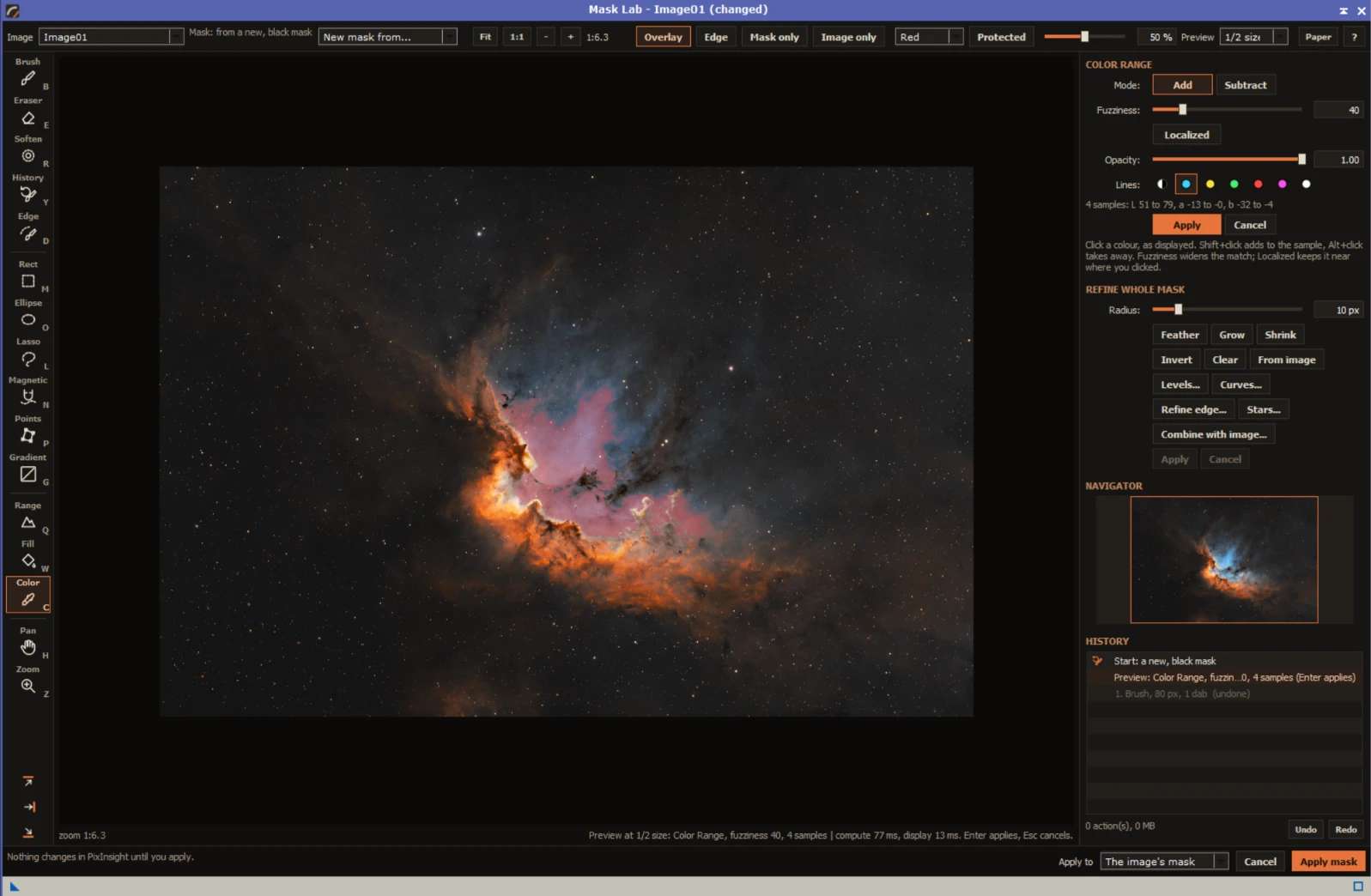
Paint, select and refine masks at full resolution in a window of their own, with brushes, a magnetic lasso, range and color selections, Refine edge and Curves, then apply the mask to your image.
Overview
Making a mask in PixInsight usually means a chain of processes: RangeSelection, StarMask, PixelMath to combine them, a convolution to soften the edge, then checking the result and starting again. Mask Lab puts it all in one window with the image inside it, so you can paint, select and refine a mask and see it on the image as you go.
Brush and erase, draw shapes and gradients, trace an edge with the Magnetic Lasso, select by brightness or color, and make the mask's edge follow the nebula with Refine edge. Combine it with a StarMask or any other mask, adjust it with Levels and Curves, step back through History, then apply it to the image's mask. Nothing changes in PixInsight until you apply.
Features
Painting
- Brush, Eraser and Soften with size, hardness, opacity, flow and smoothing
- History Brush: paint any earlier state back where you brush
- Refine Edge Brush: paint over an edge and the mask snaps to the image's own transitions
- Right-drag to resize, Shift+click for straight strokes
Shapes and lassos
- Rectangle, editable Ellipse and Points, Lasso and Gradient
- Magnetic Lasso that follows edges as you move, with auto-fastened points
- Five fill styles, from solid and feathered to luminance-protected
- Outline colors that stay visible on monochrome images
Selections
- Range: select by brightness, as displayed
- Fill: the connected area around a click
- Color Range with fuzziness and localized clusters
- Live previews: adjust, then apply or cancel
Refine
- Feather, Grow and Shrink with live preview
- Levels and Curves over the mask's histogram
- Refine edge with smart radius, smooth, feather, contrast and shift
- Add or remove stars with PixInsight's StarMask
Combine
- Add, subtract, intersect, lighter or darker with any open image of the same size
- Invert the other image first, blend by amount, see it live
- Start a new mask from black, white, the image's brightness or a copy of another image
Seeing and working
- Overlay, edge-only, mask-only and image-only views; Protected overlay like PixInsight's
- Zoom, pan and a navigator; the image shown with its own screen stretch
- History with undo and redo; every key and gesture on a help sheet
- Darkroom and Paper themes; a tool palette that moves to any side
Install
Add the FederAstro repository to PixInsight once. PixInsight then installs Mask Lab and offers every future update automatically. Everything in it is signed by a Certified PixInsight Developer.
- In PixInsight, open Resources ▸ Updates ▸ Manage Repositories.
- Click Add and paste
https://federastro.com/pixinsight/ - Click OK, then open Resources ▸ Updates ▸ Check for Updates.
- Apply the update and restart PixInsight when it asks.
- Open it from Process ▸ FederAstro ▸ Mask Lab.
Requirements
- PixInsight
- 1.9.5 or later
- Platforms
- Windows (64-bit) and macOS (Apple silicon)
- Type
- PixInsight module (a process with its own window)
- License
- Free
Changelog
Version 0.1.4
- Refine edge, Color Range and the Magnetic Lasso rewritten as FederAstro's own code, from the published methods
- Feather and Smooth blur smoothly at every size, and the preview matches Apply
- Running out of memory is reported, and nothing is applied
- Subtract from Sample always shrinks the selection
- Uses less memory, and Refine edge is faster
Version 0.1.3
- A rainbow FederAstro banner in the Process Console the first time its window opens in a session
Version 0.1.2
- Now available for macOS (Apple silicon)
- The empty area around the image no longer shows stray pixels on macOS
Version 0.1.1
- Applying into an existing mask is a normal undo step on the mask window
- Brightness as displayed matches the canvas on colour images with unlinked stretches
Version 0.1.0
- First release in the FederAstro repository
- Its own window with the image inside it: brushes, shapes, lassos, selections and refinements on a working copy of the mask
- Magnetic Lasso, Refine edge, Refine Edge Brush and Color Range
- Combine with other images and New mask from
- Documentation page in PixInsight's Documentation Browser
Credits and license
Mask Lab is written by afeder (FederAstro). Refine edge and the Refine Edge Brush use the guided filter (He, Sun and Tang); the Magnetic Lasso is a live-wire tracer (Mortensen and Barrett). This product is based on software from the PixInsight project, developed by Pleiades Astrophoto and its contributors (https://pixinsight.com/).